Shaders
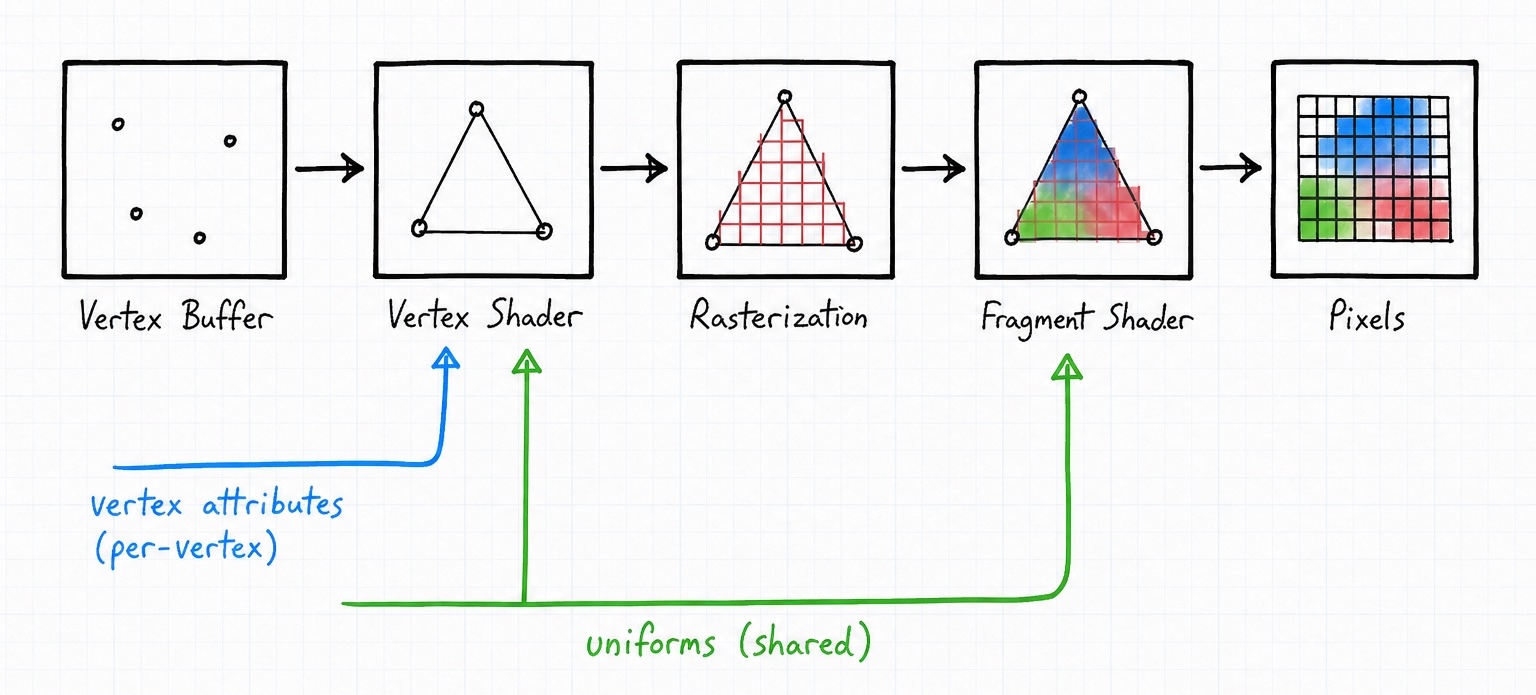
Every pixel PHP-GLFW puts on screen is decided by a shader. A shader is a small program that runs on the GPU, written in GLSL (the OpenGL Shading Language, a C-like language). Nothing draws until you have compiled at least a vertex shader (which positions your geometry) and a fragment shader (which colors it), linked them into a program, and told OpenGL to use it.
If this is your very first shader, start with the Drawing a Triangle tutorial. It walks through the whole pipeline slowly, from scratch. This page assumes you have seen that once and now want to do it for real: compile shaders while actually seeing the compiler's error messages, and feed live data into them through uniforms and vertex attributes. That data bridge is where PHP-GLFW adds the most on top of plain OpenGL, so it is where we will spend the most time.
Writing a shader in GLSL
You write shaders in GLSL, not PHP. There is no transpiler: you hand OpenGL the GLSL source as a plain string, and PHP heredocs are the comfortable way to keep that source readable inline. A minimal pair looks like this.
#version 330 core
layout (location = 0) in vec3 a_position;
layout (location = 1) in vec2 a_uv;

out vec2 v_uv;

uniform mat4 model;
uniform mat4 view;
uniform mat4 projection;

void main()
{
    v_uv = a_uv;
    gl_Position = projection * view * model * vec4(a_position, 1.0f);
}
#version 330 core
out vec4 fragment_color;

in vec2 v_uv;

void main()
{
    fragment_color = vec4(v_uv.x, v_uv.y, 1.0f, 1.0f);
}
Two kinds of input flow into a shader, and they map to the two big sections of this page. The layout (location = N) in attributes are per-vertex data pulled from a buffer (see Connecting buffers to shader inputs). The uniform values are set once from PHP and stay constant for every vertex in a draw call (see Feeding data in with uniforms). Values you out of the vertex shader arrive as matching in values in the fragment shader, interpolated across the triangle.
In PHP-GLFW you keep this GLSL as a heredoc string:
Compiling and linking
OpenGL never throws. When a shader fails to compile, the call simply succeeds quietly and your screen stays black, which is a miserable way to debug. The single most useful habit you can build is to check the status after every compile and link, and to read the info log so you see the actual error.
PHP-GLFW makes that log easy to reach. Where OpenGL fills a C buffer through out-parameters, glGetShaderInfoLog and glGetProgramInfoLog simply return the message as a PHP string. Here is a small helper that compiles a shader stage and, on failure, puts the GPU's own explanation into the exception:
function compileShaderStage(int $type, string $source) : int
{
    $shader = glCreateShader($type);
    glShaderSource($shader, $source);
    glCompileShader($shader);

    // glGetShaderiv writes the result into $success by reference
    glGetShaderiv($shader, GL_COMPILE_STATUS, $success);
    if (!$success) {
        throw new Exception('Shader compilation failed: ' . glGetShaderInfoLog($shader, 4096));
    }

    return $shader;
}
Notice how glGetShaderiv reports back: you pass a $success variable and it is filled by reference. That is the pattern for every ...iv query in the API, so $success holds the compile status after the call returns.
One string, not an array
Raw OpenGL's glShaderSource takes an array of source strings plus a count. In PHP that is rarely useful, so glShaderSource is simplified to take a single string. Pass your whole shader as one heredoc.
Linking follows the same shape: create a program, attach the compiled stages, link, then check glGetProgramiv with GL_LINK_STATUS.
function linkProgram(int $vertexShader, int $fragShader) : int
{
    $program = glCreateProgram();
    glAttachShader($program, $vertexShader);
    glAttachShader($program, $fragShader);
    glLinkProgram($program);

    glGetProgramiv($program, GL_LINK_STATUS, $success);
    if (!$success) {
        throw new Exception('Shader program could not be linked: ' . glGetProgramInfoLog($program, 4096));
    }

    // the individual shaders are baked into the program now,
    // so their standalone objects can be freed
    glDeleteShader($vertexShader);
    glDeleteShader($fragShader);

    return $program;
}
Put together, compiling a full program becomes a two-line affair:
$vs = compileShaderStage(GL_VERTEX_SHADER, $vertexSource);
$fs = compileShaderStage(GL_FRAGMENT_SHADER, $fragmentSource);
$cubeShader = linkProgram($vs, $fs);
Tip
This is essentially what ExampleHelper::compileShader() does in the bundled examples. Once a shader is linked into a program you no longer need the individual shader objects, so glDeleteShader them right away to free GPU memory.
Activating a program
OpenGL is a state machine: you switch the "current" shader on, then every draw call after that uses it. Activate a linked program with glUseProgram at the top of your render loop, before you set uniforms or draw.
Everything you draw from here on runs through $cubeShader, until you call glUseProgram with a different program.
Feeding data in with uniforms
A uniform is a value you set from PHP that every invocation of the shader sees, for one draw call: a transformation matrix, a light color, the current time. This is how your PHP application talks to a running shader, and it is the part the triangle tutorial does not cover.
Finding a uniform location
Before you can set a uniform you need its location, a small integer handle OpenGL assigns to each named uniform in a linked program. You look it up by name with glGetUniformLocation:
A location of -1 means the uniform is not there
If the name does not exist in the program, or the GLSL compiler removed it because nothing in the shader used it, you get -1 back. Setting a uniform at -1 is silently ignored, so if a uniform "does nothing," check the name and make sure the shader actually reads it.
Scalars and vectors
For plain numbers there is a family of setters named by their argument count and type: glUniform1f through glUniform4f for floats, and glUniform1i through glUniform4i for integers (with matching ui and d variants for unsigned and double). You may pass the location directly from the lookup:
// a light direction and a white light color, straight into three floats each
glUniform3f(glGetUniformLocation($objectShader, 'light_dir'), 0.0, 0.7, 0.3);
glUniform3f(glGetUniformLocation($objectShader, 'light_color'), 1.0, 1.0, 1.0);
Passing math objects directly
Here is where PHP-GLFW is nicer than raw OpenGL. You almost always already have your values as Mat4 and Vec3 objects from the math library, and there are convenience setters that accept those objects directly, with no manual flattening into a buffer:
// a spinning cube: model, view and projection matrices straight from the math library
glUniformMatrix4f(glGetUniformLocation($cubeShader, 'model'), GL_FALSE, $model);
glUniformMatrix4f(glGetUniformLocation($cubeShader, 'view'), GL_FALSE, $view);
glUniformMatrix4f(glGetUniformLocation($cubeShader, 'projection'), GL_FALSE, $projection);

// and a per-mesh color from a Vec3
glUniformVec3f(glGetUniformLocation($objectShader, 'mesh_color'), $meshColor);
glUniformMatrix4f takes a \GL\Math\Mat4 (the middle argument is the transpose flag, normally GL_FALSE), and glUniformVec3f takes a \GL\Math\Vec3. There are also glUniformVec2f and glUniformVec4f.
These helpers are PHP-GLFW extensions
glUniformMatrix4f and the glUniformVec*f setters are not part of the OpenGL API; PHP-GLFW adds them so your math objects go straight to the GPU. Note there is only a Mat4 helper, no Mat3 equivalent. For a 3x3 matrix, upload it through the buffer form below.
Arrays and buffers
When you genuinely need to upload many values at once (an array of bone matrices, a palette of colors), reach for the vector forms like glUniform3fv and glUniformMatrix4fv. These take a FloatBuffer or a plain PHP array instead of individual arguments:
// upload one matrix from a FloatBuffer (the "v" form)
glUniformMatrix4fv(glGetUniformLocation($cubeShader, 'model'), GL_FALSE, $matrixBuffer);
For the common case of a single matrix or vector you already hold as a math object, prefer the glUniformMatrix4f / glUniformVec3f helpers above; they are shorter and do the flattening for you.
Connecting buffers to shader inputs
The other half of a shader's input is its layout (location = N) in attributes, the per-vertex data. This is covered end to end in the Drawing a Triangle tutorial, so here is just the shape of it and how it ties back to your GLSL.
You upload vertex data with glBufferData, which in PHP-GLFW takes a typed buffer object directly (it works out the byte size itself), then describe its layout with glVertexAttribPointer:
glGenVertexArrays(1, $VAO);
glGenBuffers(1, $VBO);

glBindVertexArray($VAO);
glBindBuffer(GL_ARRAY_BUFFER, $VBO);
glBufferData(GL_ARRAY_BUFFER, $vertices, GL_STATIC_DRAW); // $vertices is a FloatBuffer

// position -> layout (location = 0) in vec3 a_position;
glVertexAttribPointer(0, 3, GL_FLOAT, GL_FALSE, GL_SIZEOF_FLOAT * 5, 0);
glEnableVertexAttribArray(0);

// uv -> layout (location = 1) in vec2 a_uv;
glVertexAttribPointer(1, 2, GL_FLOAT, GL_FALSE, GL_SIZEOF_FLOAT * 5, GL_SIZEOF_FLOAT * 3);
glEnableVertexAttribArray(1);
The first argument to glVertexAttribPointer is the attribute index, and it must match the location in your GLSL: index 0 feeds layout (location = 0), index 1 feeds layout (location = 1), and so on. The stride and offset are given in bytes, which is why we multiply by GL_SIZEOF_FLOAT rather than hard-coding numbers. For the full explanation of size, stride, and offset, see the triangle tutorial's Vertex attribute pointers section.
Organizing shaders in a real application
Defining shaders as inline heredocs is perfect for learning and for small examples, but a real application quickly wants more: loading GLSL from files, an include system for shared snippets, and caching so you compile each program once.
Two habits pay off early. Compile every program at startup rather than in the render loop, and cache the handles. And because glGetUniformLocation is a lookup, resolve each location once (right after linking) and store it, instead of calling it for every uniform on every frame.
// resolve locations once, reuse them each frame
$loc = [
    'model'      => glGetUniformLocation($cubeShader, 'model'),
    'view'       => glGetUniformLocation($cubeShader, 'view'),
    'projection' => glGetUniformLocation($cubeShader, 'projection'),
];
Higher-level shader handling
Managing shaders by hand gets repetitive fast. The VISU framework built on top of PHP-GLFW offers a ShaderProgram class that wraps loading, compiling, and uniform handling for you, if you would rather not build that yourself.
Full API Reference
For the exhaustive argument list of every function used here, see the generated OpenGL reference: glCreateShader, glShaderSource, glCompileShader, glGetShaderiv, glGetShaderInfoLog, glLinkProgram, glGetProgramInfoLog, glUseProgram, glGetUniformLocation, and glUniformMatrix4f.
See Also
- Drawing a Triangle the from-scratch walkthrough of the whole pipeline
- Textures sampling images inside a fragment shader
- Matrices building the model, view, and projection matrices you upload as uniforms
- Buffers the typed buffers you feed to
glBufferDataand the...vuniform forms