Matrices
A matrix is the single most important object in 3D graphics: it's how you move, rotate, scale, and project everything you draw. One 4x4 matrix can hold a whole transform, position, orientation, and size all at once, and multiplying matrices together lets you stack those transforms cleanly. PHP-GLFW provides the Mat4 class, a 4x4 matrix, for exactly this.
If matrices have always felt like a black box, that's fine, this page keeps things practical. You'll mostly build matrices with helper methods like translate() and perspective() and combine them with *, rarely touching the raw numbers.
Creating a matrix
A fresh Mat4 is the identity matrix, the transform that changes nothing, and the natural starting point for building up your own:
Accessing elements
Unlike vectors, a matrix has no named properties. Its 16 values are stored as one flat, column-major array, and you reach them by index with the array operator:
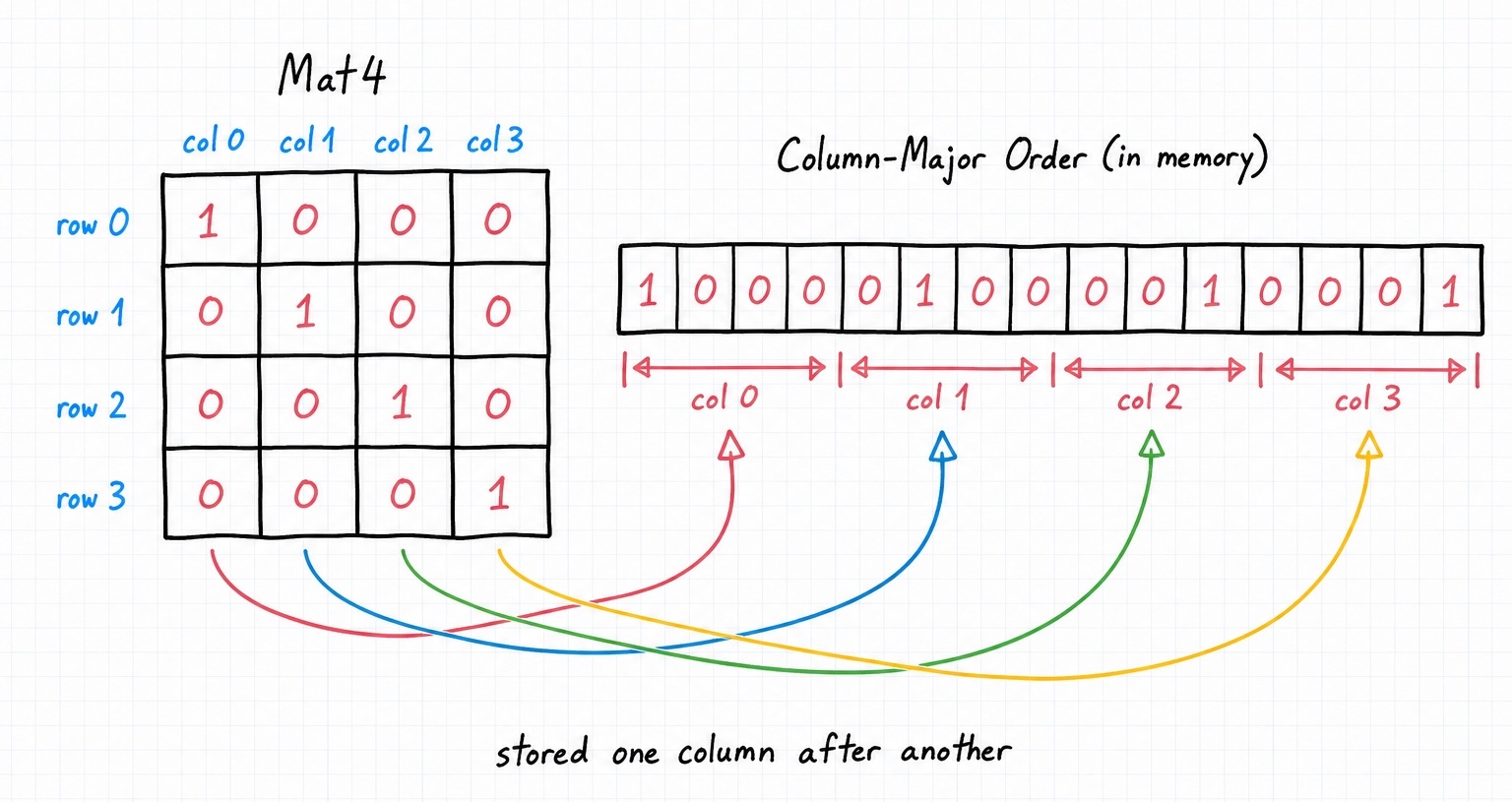
You'll rarely poke at individual elements, but when you need a whole row or column as a vector, row() and col() return a Vec4 (with setRow() and setCol() to write them back):
$m = Mat4::fromArray([
    1, 2, 3, 4,
    5, 6, 7, 8,
    9, 10, 11, 12,
    13, 14, 15, 16,
]);

echo $m->row(0); // vec4(1.0, 2.0, 3.0, 4.0)
echo $m->col(0); // vec4(1.0, 5.0, 9.0, 13.0)
Mat4::fromArray() builds a matrix straight from a flat array of 16 values, which is useful when you already have the numbers.
Building a transform
Here's where matrices earn their keep. The transform methods below each modify the matrix in place and compose: every call layers another transform on top of what's already there. So you start from identity and apply translate, rotate, and scale to describe where an object sits in the world:
use GL\Math\{Mat4, Vec3, GLM};

$model = new Mat4;
$model->translate(new Vec3(10, 50, 1));       // move it
$model->rotate(GLM::radians(90), new Vec3(0, 0, 1)); // spin it around z
$model->scale(new Vec3(2, 2, 2));             // double its size
That single $model matrix now encodes all three operations. Apply it to a point by multiplying, and the result is the transformed point:
Operators
Matrices support +, -, and *. Addition and subtraction are element-wise, but * is the interesting one, and it depends on what's on the right:
$result = $matA * $matB;   // Mat4, the combined transform
$vec3   = $model * $point; // Vec3, a transformed point
$vec4   = $model * $vec4;  // Vec4, a transformed homogeneous point
$mat    = $model * $quat;  // Mat4, matrix combined with a rotation
Order matters, always parenthesize
Matrix multiplication is not commutative: A * B applies B first, then A, and swapping them gives a different result. On top of that, PHP's engine can reorder * operands in longer expressions (see the Overview). Both problems have the same fix, parenthesize each multiplication and assign intermediate results to their own variable:
// do this
$vp  = $projection * $view;
$mvp = $vp * $model;

// not this
$mvp = $projection * $view * $model; // risky, and easy to get backwards
When you want to be explicit about a matrix-times-quaternion, Mat4::multiplyQuat($matrix, $quat) avoids the operator altogether.
Cameras and projection
Beyond object transforms, Mat4 builds the two matrices every 3D scene needs: a view matrix (where the camera is and what it's looking at) and a projection matrix (how the 3D world is flattened onto your 2D screen). Each of these methods replaces the matrix's contents with the requested transform.
lookAt: point the camera
lookAt() builds a view matrix from three vectors: where the camera sits, the point it's aimed at, and which way is up.
use GL\Math\{Mat4, Vec3};

$view = new Mat4;
$view->lookAt(
    new Vec3(0, 0, 5), // eye, camera position
    new Vec3(0, 0, 0), // center, the point to look at
    new Vec3(0, 1, 0)  // up
);
perspective: a realistic 3D view
perspective() builds the projection most 3D scenes use, where distant objects appear smaller. You give it a field of view (in radians), the aspect ratio of your window, and the near and far clipping distances:
$projection = new Mat4;
$projection->perspective(
    GLM::radians(70.0), // field of view
    800.0 / 600.0,      // aspect ratio (width / height)
    0.1,                // near plane
    100.0               // far plane
);
ortho: a flat, scale-preserving view
ortho() builds an orthographic projection, where objects keep their size regardless of distance, ideal for 2D games, UI, and CAD-style views:
Other useful operations
Following the mutating-vs-non-mutating convention: inverse() changes the matrix in place, while Mat4::inverted() returns a new one.
$m = new Mat4;
$m->translate(new Vec3(10, 50, 1));

$m->inverse();                // in place
$back = Mat4::inverted($m);   // as a new matrix
transpose() flips the matrix across its diagonal, and determinant() returns its determinant (a value of 0 means the matrix can't be inverted). The Mat4 API reference lists everything.
With vectors, quaternions, and matrices in hand, you have all the pieces. The next page assembles them into a real, moving 3D render, so head to Working in 3D Space.