Vertex Layouts
When you load a model, the parser hands you a flat GL\Buffer\FloatBuffer: one long run of floats with nothing to label them. Before you can upload it to the GPU you need to know exactly what is in there, in what order, and how many floats belong to each vertex. Rather than make you guess, GL\Geometry\ObjFileParser lets you spell that out with a short layout string, and it builds the buffer to match.
Every method that returns vertex data takes this string as its first argument. Each character is one attribute, and they land in the buffer in the order you wrote them:
That call gives you a buffer laid out as [px, py, pz, nx, ny, nz, u, v, ...], repeated for every vertex. You are free to ask for as much or as little as your shader actually reads, and the buffer never carries anything you did not request.
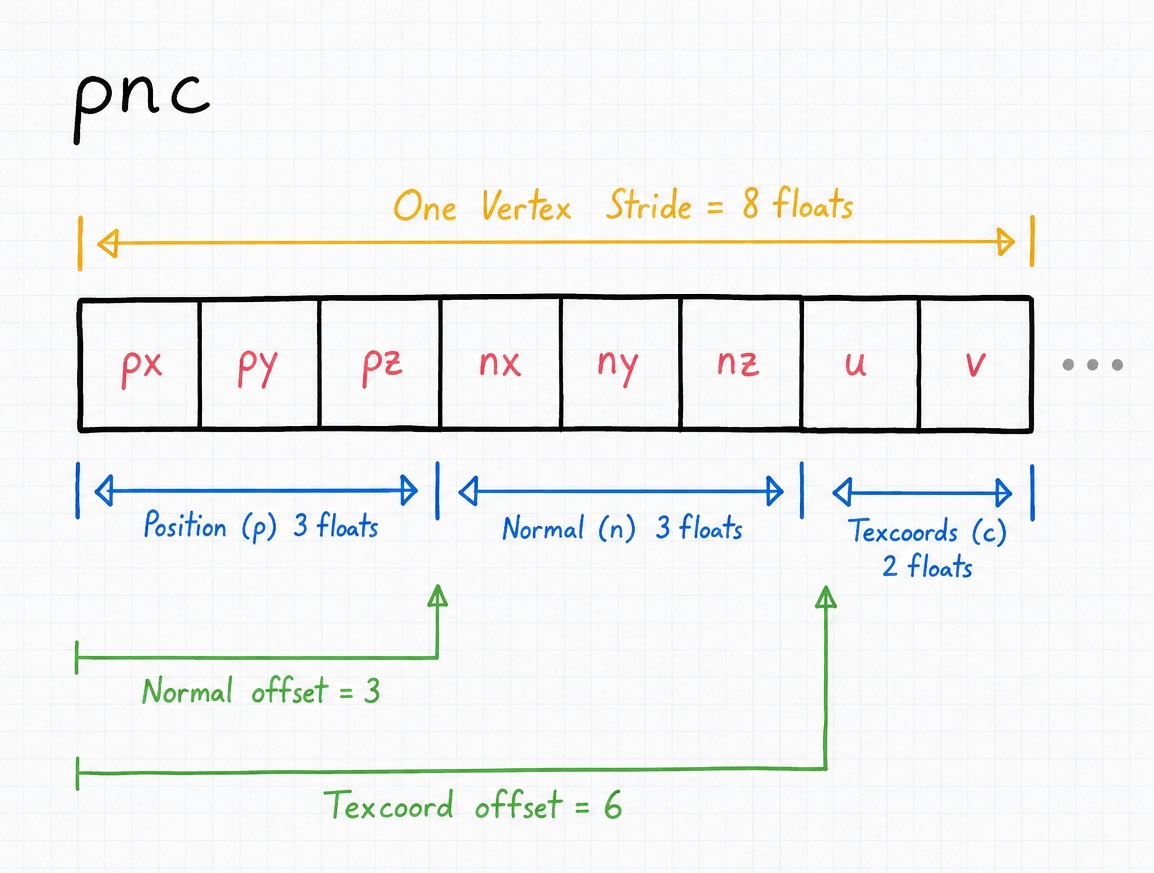
The tokens
There are six characters you may use. The layout is case sensitive, so n and N are two different attributes:
| Token | Floats | Attribute |
|---|---|---|
p |
3 | Position (x, y, z) |
n |
3 | Normal read from the file |
N |
3 | Generated flat normal (one per face, computed for you) |
c |
2 | Texture coordinates (u, v) |
t |
3 | Generated tangent |
b |
3 | Generated bitangent |
There is no default layout, so the string is required. Anything outside this set stops the import with a clear error so you are never left guessing: Invalid layout string only (p, n, N, c, t, b) are allowed.
Warning
c is texture coordinates (u, v), not color. The OBJ layout language has no color token at all, and that letter is the one people most often trip over. If you need per-vertex color, bake it into a texture or supply it through a separate buffer.
Computing the stride
Your stride, the number of floats per vertex, is just the sum of the tokens: 3 floats each for p, n, N, t, and b, and 2 floats for c. That is the whole rule, so a quick glance at the string tells you the size:
| Layout | Floats per vertex | Breakdown |
|---|---|---|
p |
3 | 3 |
pn |
6 | 3 + 3 |
pnc |
8 | 3 + 3 + 2 |
pnctb |
14 | 3 + 3 + 2 + 3 + 3 |
You need that number, plus the running offset of each attribute, to set up your vertex attribute pointers. Let's wire up the pnc buffer from above. Notice how each offset is simply the floats that came before it:
$stride = 8 * GL_SIZEOF_FLOAT;

// position (location 0), starts at 0
glVertexAttribPointer(0, 3, GL_FLOAT, GL_FALSE, $stride, 0);
glEnableVertexAttribArray(0);

// normal (location 1), 3 floats in
glVertexAttribPointer(1, 3, GL_FLOAT, GL_FALSE, $stride, 3 * GL_SIZEOF_FLOAT);
glEnableVertexAttribArray(1);

// texture coords (location 2), 6 floats in
glVertexAttribPointer(2, 2, GL_FLOAT, GL_FALSE, $stride, 6 * GL_SIZEOF_FLOAT);
glEnableVertexAttribArray(2);
If you change the layout string later, remember that every offset after the change shifts too, so keep the string and these pointers in step.
Attributes generated on demand
Three of the tokens do not exist in the source file. The parser derives them from the geometry the moment you ask, which means you can add lighting data to a model that shipped without it:
Ncomputes a flat normal per face from the cross product of its edges. Reach for it when your.objhas no normals, or when you deliberately want a faceted look.tandbcompute a tangent and bitangent per face, the extra basis vectors that normal mapping needs.
Each of these costs a pass of per-face math, so it is worth including them only when your shader uses them. Leave them out and you pay nothing.
Which methods take the layout
The same string works across every vertex-producing method on the OBJ parser, so once you know one you know them all:
getVertices($layout, $group)returns a plain vertex buffer.getIndexedVertices($layout, $group)returns a deduplicated buffer plus a matching index buffer.getMeshes($layout)andgetIndexedMeshes($layout)return the same data split per material group.
The Wavefront Object Files guide walks through the full loading workflow, and the ObjFileParser reference lists the exact signatures.
What about MagicaVoxel?
If you have used the VoxFileParser, you may expect the same string here, but the voxel mesher works a little differently. It does not take a layout string. Its meshing always emits position (3) and normal (3), and you shape the color part through an $options array (colors set to rgb, rgba, or none, plus an optional palette index) instead of characters. Don't worry, the result is still a plain interleaved buffer, so the stride math on this page applies exactly the same way. The MagicaVoxel Files guide covers those options in full.