Vectors
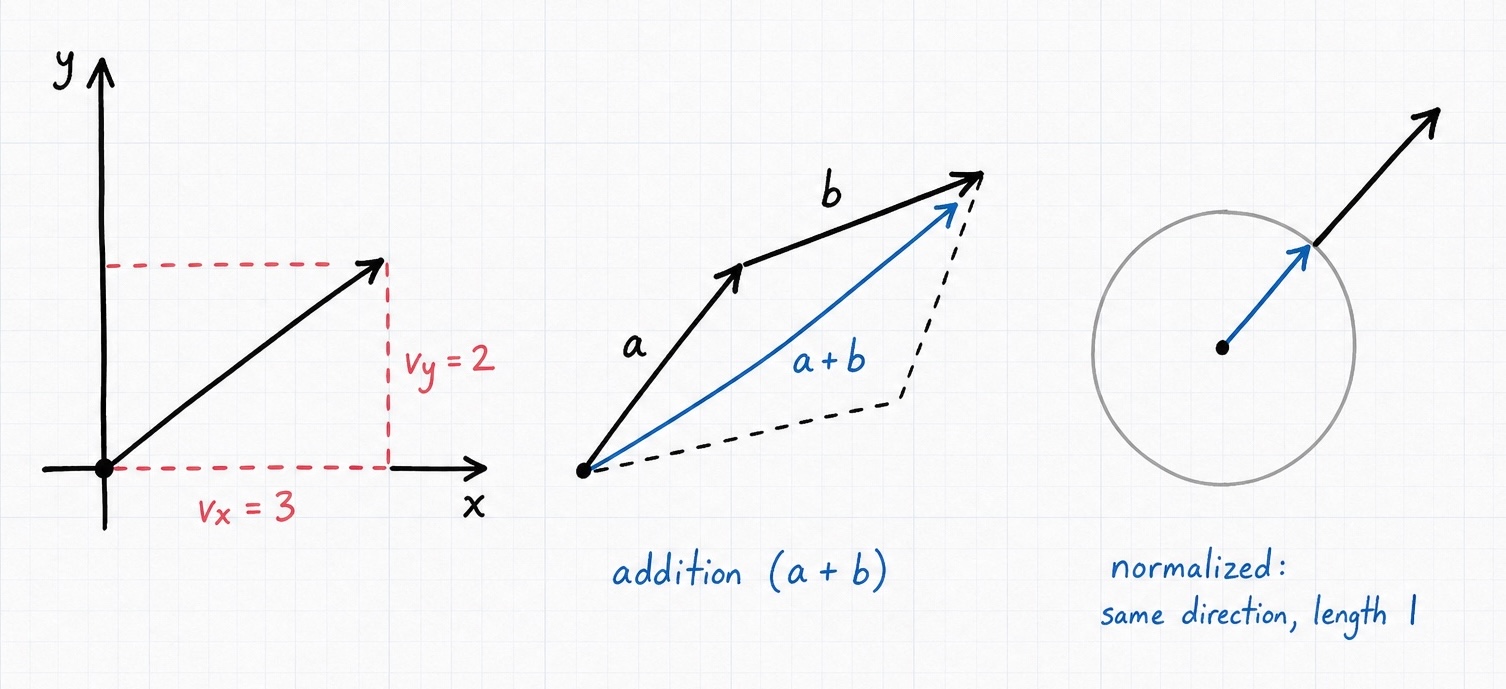
A vector is just a small, fixed group of numbers, but that simple idea does an enormous amount of work in graphics. A point in space, the direction something is facing, how fast it's moving, and even an RGBA color are all vectors. PHP-GLFW gives you three of them, and the number in the name is the number of components:
Vec2has two components ($x,$y).Vec3has three components ($x,$y,$z).Vec4has four components ($x,$y,$z,$w).
They all share the same shape, so once you're comfortable with one you know all three. The examples below use Vec3, but the same methods exist on the others unless noted.
Creating a vector
Pass one value per component to the constructor:
You may leave the arguments out to get a zero vector, or pass a single value to fill every component with it, a convenient shortcut when you want, say, a uniform scale:
Reading and writing components
Access the components through the $x, $y, $z, $w properties. They're readable and writable:
$position = new Vec3(1.0, 2.0, 3.0);

echo $position->y;   // 2.0
$position->z = 9.0;  // move it along z
Color aliases
Because vectors so often hold colors, each component has a color alias mapped to the very same slot: $r, $g, $b, $a for $x, $y, $z, $w. Use whichever name reads better for the job:
use GL\Math\Vec4;

$tint = new Vec4(0.2, 0.4, 0.8, 1.0);
$tint->r = 1.0;    // identical to $tint->x = 1.0
echo $tint->x;     // 1.0
Index access
You may also reach a component by its index, which is handy inside loops:
Operators
Vectors support the four arithmetic operators, and they apply component-wise between two vectors of the same class:
$a = new Vec3(1.0, 2.0, 3.0);
$b = new Vec3(4.0, 5.0, 6.0);

echo $a + $b; // vec3(5.0, 7.0, 9.0)
echo $a - $b; // vec3(-3.0, -3.0, -3.0)
echo $a * $b; // vec3(4.0, 10.0, 18.0)
echo $a / $b; // vec3(0.25, 0.4, 0.5)
The same operators work with a plain number (a scalar), applying it to every component. This is how you scale a direction or offset a position uniformly:
$a = new Vec3(1.0, 2.0, 3.0);

echo $a * 2.0; // vec3(2.0, 4.0, 6.0)
echo $a + 1.0; // vec3(2.0, 3.0, 4.0)
Common operations
The methods below are the ones you'll reach for most. Remember the mutating-vs-non-mutating convention: the instance method changes the vector in place, the static method returns a new one. For the complete list, see the Vec3 API reference.
Length
length() returns the magnitude of the vector, that is, how far its tip sits from the origin:
Normalize
Very often you don't care how long a vector is, only which way it points, a "unit" vector of length 1. That's what normalizing gives you, and it's essential for directions, surface normals, and lighting.
Use the static normalized() to get a new vector and keep the original:
$dir = new Vec3(1.0, 2.0, 3.0);
$unit = Vec3::normalized($dir); // vec3(0.267, 0.534, 0.801)
// $dir is unchanged
Or use the instance normalize() to change the vector in place:
If you'd rather not remember which vector class you're holding, GLM::normalize() accepts any of the three and returns a normalized copy:
Dot product
The dot product multiplies two vectors into a single number. Its most common use is comparing directions: the dot of two unit vectors is 1.0 when they point the same way, 0.0 when perpendicular, and -1.0 when opposed, which is exactly what you need for lighting and "is this in front of me?" checks.
Cross product
The cross product (available on Vec3) returns a new vector that is perpendicular to both inputs, the go-to tool for computing a surface normal from two edges:
$edge1 = new Vec3(1.0, 0.0, 0.0);
$edge2 = new Vec3(0.0, 1.0, 0.0);

echo Vec3::cross($edge1, $edge2); // vec3(0.0, 0.0, 1.0)
Distance
To measure how far apart two points are, use distance():
$a = new Vec3(5.0, 12.5, 7.5);
$b = new Vec3(0.5, 2.0, 0.75);

echo Vec3::distance($a, $b); // 13.268
Comparing distances a lot, say, to find the nearest of many objects? distance2() returns the squared distance, which skips the expensive square root. The ordering is identical, so it's a free speed-up whenever you only need to compare distances rather than report them.
Interpolation
To smoothly blend between two vectors, such as animating a position or fading a color, use mix() (also spelled lerp(), they're identical) with a factor $t from 0.0 to 1.0:
$start = new Vec3(0.0, 0.0, 0.0);
$end   = new Vec3(10.0, 0.0, 0.0);

echo Vec3::mix($start, $end, 0.5); // vec3(5.0, 0.0, 0.0), halfway
slerp() does the same along a spherical arc, which gives more natural results when interpolating directions rather than positions.
Feeding vectors to OpenGL
Once you've computed your vertex data, you'll usually hand it to a GL\Buffer\FloatBuffer to upload to the GPU. The buffer knows how to unpack a vector into its component floats for you:
use GL\Buffer\FloatBuffer;
use GL\Math\{Vec2, Vec3};

$buffer = new FloatBuffer();
$buffer->pushVec3(new Vec3(0.5, 0.5, 0.0));
$buffer->pushVec2(new Vec2(1.0, 1.0));
This is the bridge from the math library into your actual geometry. To see it in a full render, head to Working in 3D Space.