Vectors, Matrices & Conversions
Most of the buffer API is the same across every type, but a few classes carry extra methods tailored to the kind of data they hold. This page collects those specialized helpers: pushing math objects into a FloatBuffer, storing strings and raw bytes in a UByteBuffer, reading a buffer back as a binary string, and shrinking floats down to compact bytes.
Pushing vectors and matrices
When you build vertex data by hand, you rarely think in loose floats, you think in positions, directions, and transforms, which the math library already gives you as Vec3, Vec4, and Mat4 objects. Flattening those into individual push calls by hand is error prone, so the FloatBuffer offers helpers that unpack a math object straight into the buffer in the right order.
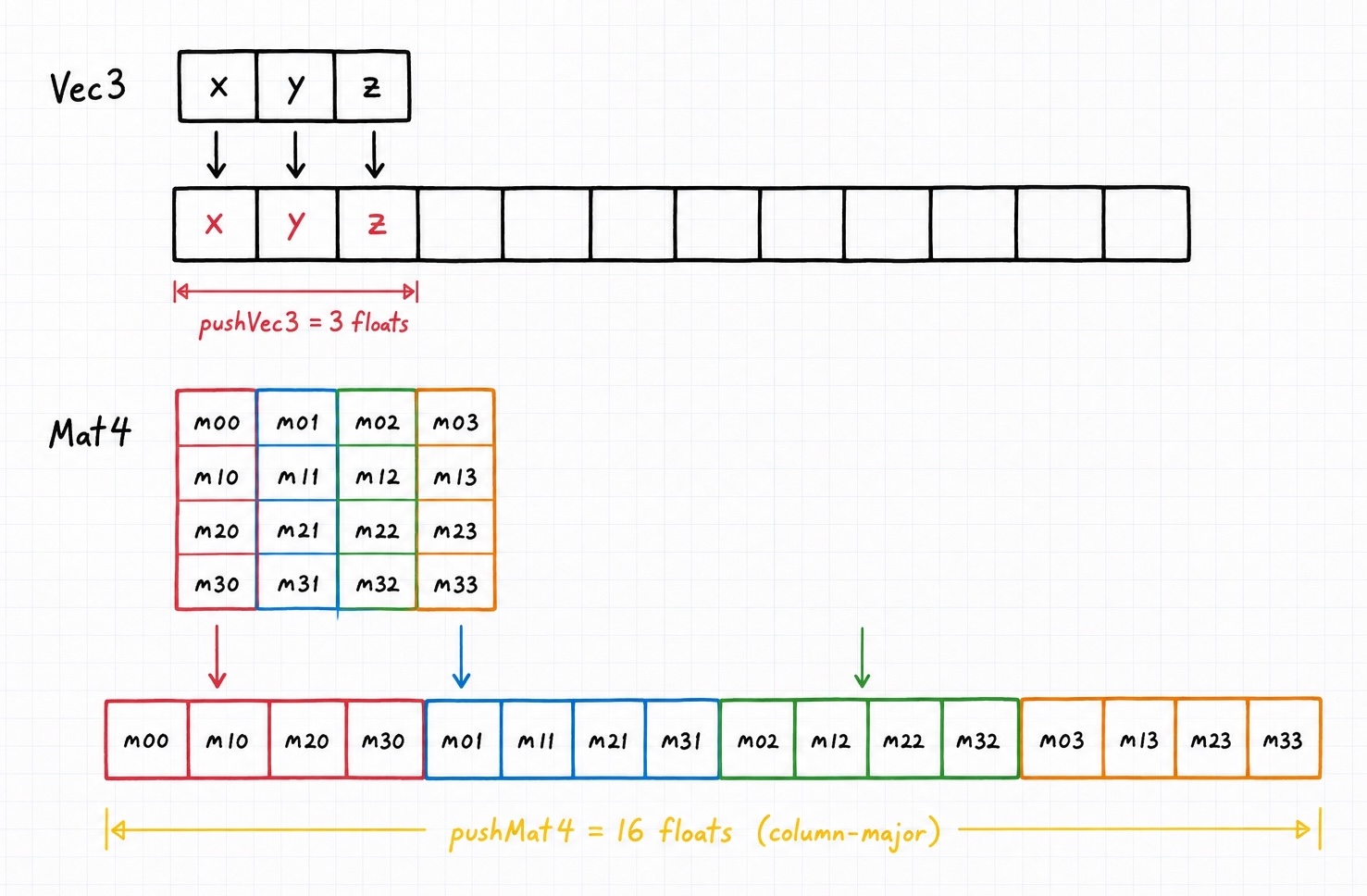
To append a vector, use pushVec2, pushVec3, or pushVec4. Each one pushes the object's components in order:
use GL\Buffer\FloatBuffer;
use GL\Math\Vec3;

$vertices = new FloatBuffer();

$vertices->pushVec3(new Vec3(0.5, -0.5, 0.0));
// exactly the same as: $vertices->push(0.5); push(-0.5); push(0.0);
A Mat4 works the same way through pushMat4, which appends all 16 values in the column-major order OpenGL expects. This is what makes instance transforms so convenient to assemble:
use GL\Buffer\FloatBuffer;
use GL\Math\{Mat4, Vec3};

$matrices = new FloatBuffer();

foreach ($shipPositions as $position) {
    $transform = new Mat4();
    $transform->translate($position);

    $matrices->pushMat4($transform);
}

glBufferData(GL_ARRAY_BUFFER, $matrices, GL_STATIC_DRAW);
You can see this used to place tens of thousands of instances in examples/04_instancing.php.
Strings and raw bytes
The UByteBuffer holds unsigned bytes, which makes it the natural home for raw binary data such as texture pixels or file contents. Rather than pushing each byte's numeric value one call at a time, pushString appends every byte of a PHP string for you:
use GL\Buffer\UByteBuffer;

$pixels = new UByteBuffer();
$pixels->pushString(file_get_contents('heightmap.raw'));
Each character in the string becomes one GLubyte in the buffer, so this is the quickest way to move an existing blob of bytes into a buffer.
Reading a buffer as binary
Occasionally you will want the raw bytes back out of a buffer, to write them to a file, hash them, or hand them to another library. dump returns the buffer's contents as a binary string, exactly as they are laid out in memory:
The returned string is the packed C representation, so a FloatBuffer of three elements yields 12 bytes. It pairs naturally with pushString on a matching buffer type when you want to round-trip data back in.
Quantizing floats to bytes
Vertex attributes like colors or normals are often stored as floats while you work with them, but a float is four bytes and you rarely need that precision on the GPU. Packing each value into a single byte cuts the memory footprint to a quarter, which adds up fast across a large mesh.
quantizeToUChar does this conversion for you. It reads a FloatBuffer and returns a brand new UByteBuffer, mapping the float range onto the 0 to 255 byte range. The original buffer is left unchanged:
function quantizeToUChar(bool $autoNormalize = true, float $lowerBound = 0.0, float $upperBound = 1.0) : \GL\Buffer\UByteBuffer
By default $autoNormalize is true, which means the method scans the buffer for its own smallest and largest values and stretches that range across the full 0 to 255 span, so no precision is wasted:
use GL\Buffer\FloatBuffer;

$weights = new FloatBuffer([0.0, 0.25, 0.5, 1.0]);

// the min (0.0) becomes 0 and the max (1.0) becomes 255
$bytes = $weights->quantizeToUChar();
If your data already lives in a known range and you would rather map it explicitly, pass false and give the $lowerBound and $upperBound bounds yourself. Values are then mapped so that $lowerBound becomes 0 and $upperBound becomes 255:
// map the fixed range -1.0 ... 1.0 onto 0 ... 255,
// the usual choice for packing normals
$packed = $normals->quantizeToUChar(false, -1.0, 1.0);
Autonormalize still respects your bounds
Even with $autoNormalize enabled, the scan starts from $lowerBound and $upperBound as its initial min and max. Leaving them at the defaults of 0.0 and 1.0 means the resulting range will always include zero and one, which is usually what you want for values that are conceptually normalized.
Where to go next
- The math guide covers the
VecandMat4types these helpers consume. - Filling & Reading covers the core API shared by every buffer type.